A Deep Dive into Windows Memory Allocation for C Programmers
A Deep Dive into Windows Memory Allocation for C Programmers
Memory management in C is a double-edged sword: it offers unparalleled power and control, but it also demands responsibility. For developers working on Windows, understanding how to allocate and manage memory is not just a skill—it’s essential for building robust, efficient, and secure applications.
This guide will walk you through the three primary methods of memory allocation in C on Windows: the standard malloc(), the native HeapAlloc(), and the legacy LocalAlloc(). We’ll cover each with practical examples and conclude by showing you how to write data into dynamically allocated memory—a fundamental pattern in Windows development.
1. The Standard Approach: malloc()
The malloc() function is the most common way to allocate memory in C. It’s part of the C standard library, making it portable across different operating systems. If you’re writing code that needs to run on Windows, Linux, and macOS, malloc() is your best friend.
#include <windows.h>
#include <stdio.h>
#include <stdlib.h> // Required for malloc and free

int main() {
    // Allocate 100 bytes of memory
    void* paddress = malloc(100);

    // Always check if allocation was successful
    if (paddress == NULL) {
        printf("Memory allocation failed.\n");
        return 1; // Exit with an error code
    }

    printf("[+] Base Address of Allocated Memory: 0x%p \n", paddress);

    printf("[#] Press any key to free memory and quit...");
    getchar();

    // Free the allocated memory to prevent leaks
    free(paddress);

    return 0;
}
When to Use malloc()
- Cross-Platform Code: When your application needs to be portable.
- General-Purpose Applications: For most standard applications,
malloc()is simple and effective.
Key Takeaways
- Check for
NULL:malloc()returnsNULLif it fails to allocate memory. Always check the return value. - Free Your Memory: For every
malloc(), there must be a correspondingfree(). Forgetting to free memory leads to memory leaks. - Platform-Independent: Works on any system with a standard C library.
2. The Native Windows Way: HeapAlloc()
For Windows-specific programming, the HeapAlloc() API provides more fine-grained control. It allows you to allocate memory from a specific “heap,” a region of memory managed by the OS. By default, you can use the process’s main heap.
#include <windows.h>
#include <stdio.h>

int main() {
    // Get a handle to the default heap of the current process
    HANDLE hProcessHeap = GetProcessHeap();

    // Allocate 100 bytes from the process heap
    // The second parameter (flags) can be 0 or HEAP_ZERO_MEMORY to zero-initialize the memory
    void* paddress = HeapAlloc(hProcessHeap, 0, 100);

    if (paddress == NULL) {
        printf("HeapAlloc failed with error code: %ld\n", GetLastError());
        return 1;
    }

    printf("[+] Base Address Of Allocated Memory: 0x%p \n", paddress);

    printf("[#] Press any key to free memory and quit...");
    getchar();

    // Free the memory using the same heap handle
    HeapFree(hProcessHeap, 0, paddress);

    return 0;
}
When to Use HeapAlloc()
- Windows-Specific Applications: When you are writing code that will only run on Windows.
- System-Level Programming: Ideal for services, drivers, or applications that need to manage memory efficiently.
- Multiple Heaps: Advanced scenarios where you might create separate heaps for different components to improve performance or security.
Key Takeaways
- Heap Handle is Key: You need a handle to the heap you want to allocate from.
GetProcessHeap()is the most common choice. - Paired Functions: Always pair
HeapAlloc()withHeapFree(), and make sure to use the same heap handle for both. - Error Handling: If
HeapAllocfails, you can callGetLastError()to get more information about the failure.
3. The Legacy Method: LocalAlloc()
LocalAlloc() is a legacy Windows API that dates back to 16-bit Windows. While modern Windows memory management has unified local and global heaps, this function is maintained for backward compatibility. You might encounter it in older codebases.
#include <windows.h>
#include <stdio.h>

int main() {
    // Allocate 100 bytes. LPTR combines LMEM_FIXED and LMEM_ZEROINIT,
    // so the memory is fixed and zero-initialized.
    void* paddress = LocalAlloc(LPTR, 100);

    if (paddress == NULL) {
        printf("LocalAlloc failed with error code: %ld\n", GetLastError());
        return 1;
    }

    printf("[+] Base address of Allocated Memory: 0x%p \n", paddress);

    printf("[#] Press any key to free memory and quit...");
    getchar();

    // Free the memory using LocalFree
    LocalFree(paddress);

    return 0;
}
When to Use LocalAlloc()
- Maintaining Legacy Code: When you are working on an old codebase that already uses it.
- Specific WinAPI requirements: Some older Windows APIs might require memory allocated with
LocalAlloc.
For all new development, HeapAlloc() is the recommended choice over LocalAlloc().
Compiling and Running the Examples
You can compile these examples using either MinGW (GCC) or the Microsoft Visual C++ Compiler (MSVC).
MinGW (gcc)
Open a Command Prompt and run:
gcc your_filename.c -o your_program.exe
your_program.exe
Microsoft Visual Studio (cl.exe)
Open the “Developer Command Prompt for VS” and run:
cl your_filename.c
your_filename.exe
Make sure to replace your_filename.c with the name of your source file.
Bonus: Writing Data to Allocated Memory
Allocating memory is only half the battle. The next step is to use it. Here’s how to write data into a memory block allocated with HeapAlloc().
#include <windows.h>
#include <stdio.h>
#include <string.h> // For memcpy and strlen

int main() {
    // 1. Allocate memory
    PVOID paddress = HeapAlloc(GetProcessHeap(), HEAP_ZERO_MEMORY, 100);
    if (paddress == NULL) {
        printf("HeapAlloc failed.\n");
        return 1;
    }
    printf("[+] Memory allocated at: 0x%p\n", paddress);

    // 2. Prepare data to be written
    char str[] = "Hello from allocated memory!";

    // 3. Copy the data into the allocated block
    // We add 1 to the length to include the null terminator ('\0')
    memcpy(paddress, str, strlen(str) + 1);
    printf("[+] Copied '%s' into the allocated memory.\n", (char*)paddress);

    // 4. Clean up
    HeapFree(GetProcessHeap(), 0, paddress);
    printf("[+] Memory freed.\n");

    return 0;
}
How to Verify the Data Was Written
You can use a debugger to inspect the memory and confirm the data is there. Here’s how you can do it with a command-line debugger like GDB or the Visual Studio Debugger.
-
Compile with Debug Symbols:
- GCC:
gcc -g your_file.c -o your_program.exe - MSVC:
cl /Zi your_file.c
- GCC:
-
Set a Breakpoint: Start the debugger and set a breakpoint after the
memcpycall.- In Visual Studio, you can click in the margin to the left of the line number.
- In GDB, you would use a command like
break mainand then step through the code.
-
Run the Program: The program will pause at your breakpoint.
-
Inspect the Memory: At the debugger prompt, you can print the contents of the memory at
paddress.- In Visual Studio, you can add
paddressto a “Watch” window or hover over it. - In GDB, you can use a command like
x/s paddressto examine it as a string.
- In Visual Studio, you can add
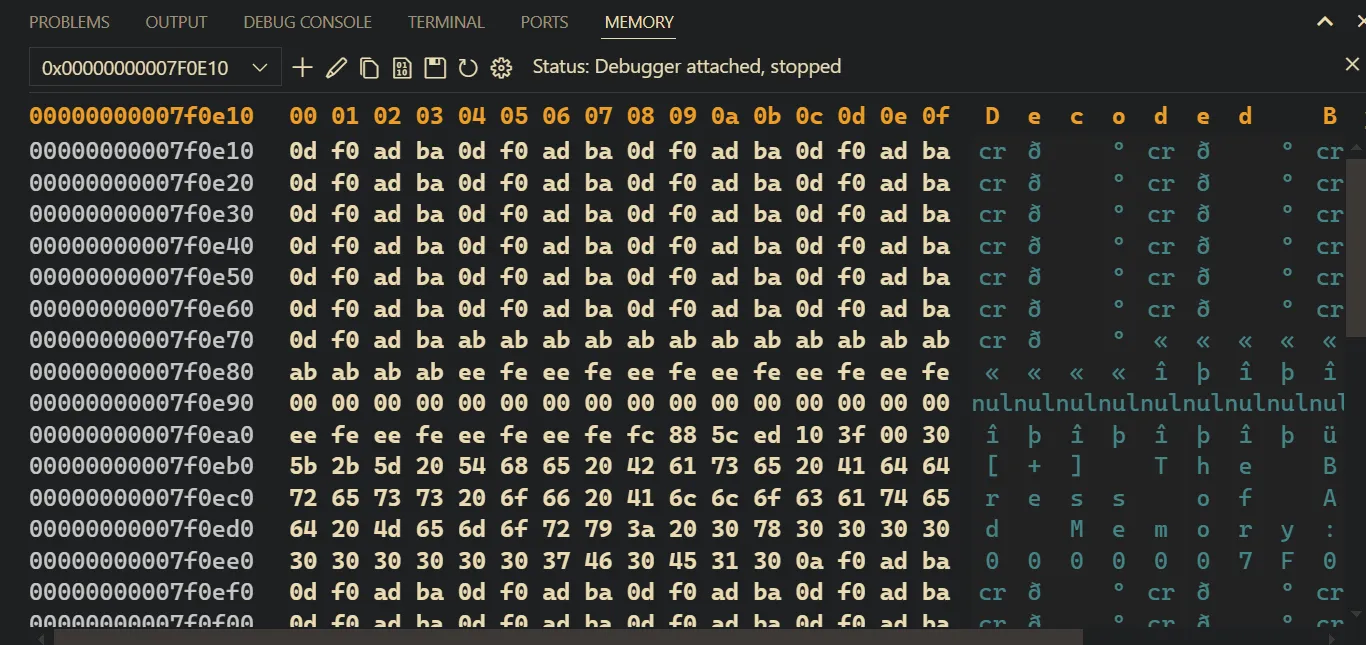
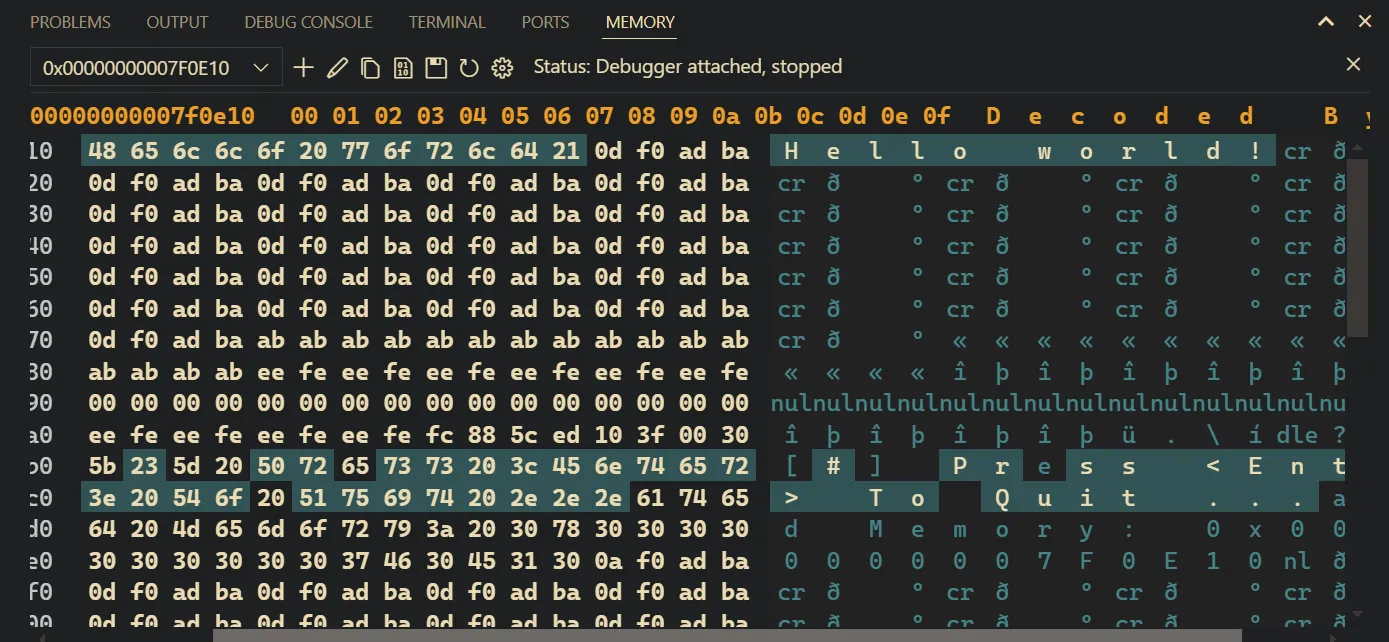
You will see the string “Hello from allocated memory!” stored at the memory address pointed to by paddress.
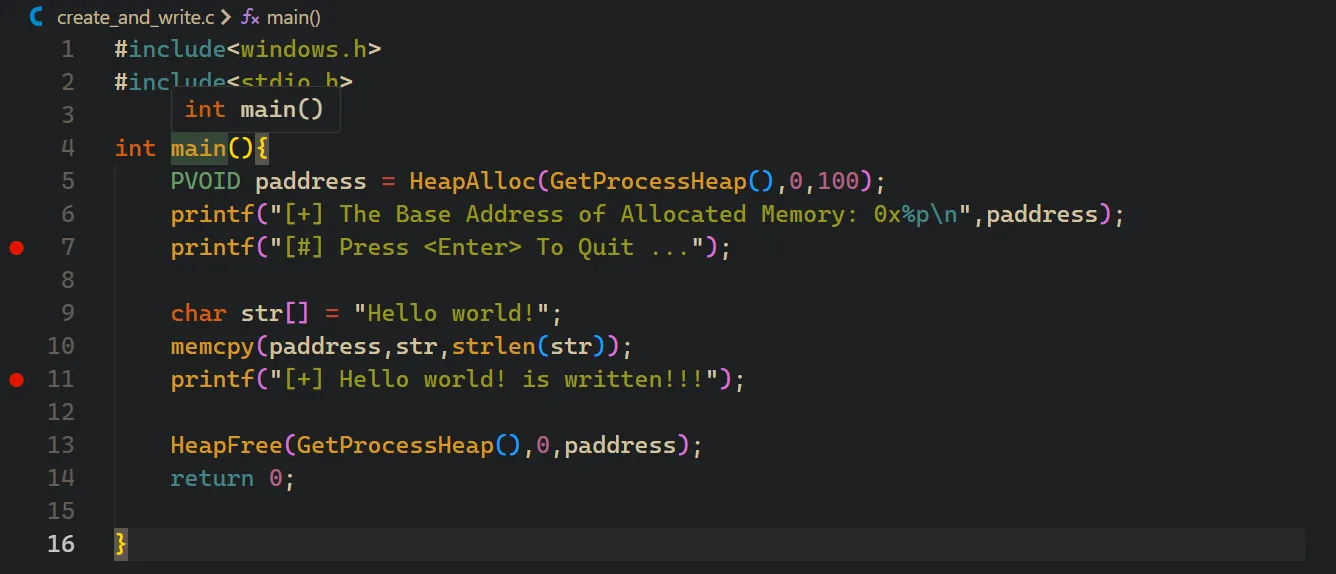 Initially, the allocated memory is empty (or zeroed out).
 After memcpy, the string is visible in the memory viewer.
Conclusion
Understanding memory allocation is fundamental for any serious C programmer on Windows. Let’s recap the key lessons:
malloc(): The go-to for portable, general-purpose applications.HeapAlloc(): The preferred, modern choice for Windows-specific development, offering more control.LocalAlloc(): A legacy function you should only use when maintaining older code.
No matter which function you use, always remember the golden rules:
- Check for allocation errors.
- Free the memory when you are done.
- Do not write past the bounds of the allocated block.
Mastering these techniques will empower you to write more efficient, reliable, and powerful Windows applications.